
How to Test AI Agent Changes Before You Deploy

TL;DR
- To test an AI agent change before you deploy, run the changed agent on real production scenarios and check its tool calls, not just its final answers. An eval scores the cases you wrote. An agent change breaks things in the cases you didn't write, usually through a tool call nobody checked.
- Raindrop Simulations replays your agent's real production events against a pull request. Your code, prompts, and model run for real. The tools and services they call are simulated from your production traces, so nothing touches production.
- Each review compares the new run with what happened in production, event by event, and flags the behavior changes worth reading before merge. You can also run it from the Playground or from your coding agent over MCP.
- Braintrust, Langfuse, Arize Phoenix, and LangSmith run experiments on datasets, and all of them can run in CI. The difference is where the test cases come from and what answers the agent's tool calls.
- Simulations is in public beta. Setup is in the docs.
Why don't passing evals prove an agent change is safe?
Evals score the cases someone wrote, and most graders read only the final answer. An agent change usually breaks a workflow nobody put in the dataset, or breaks it in a tool call the grader never sees.
Take a trip planner agent. You switch it to a faster model to cut latency. The eval suite passes: the answers read well, the itineraries are complete, the judge scores hold. In production, the new model books a nonrefundable flight for a customer who asked for a refundable one. The final message even says "booked." Nothing in the eval looked at which fare the booking tool was called with.
That gap has three causes.
Evals check what you thought to check. A dataset is a list of cases someone picked. A model swap or prompt edit changes behavior across every workflow the agent handles, including the ones nobody put in the dataset.
Scoring the answer misses the action. Most of the damage an agent does happens in tool calls: a booking, a refund, a database write, an email. A grader that reads the final message can't see that the agent called the right tool with the wrong argument.
A recorded trace covers one path. Replaying a production trace with its saved tool responses works until the changed agent does something different. If it calls a new tool, or the same tool in a new order, there is no saved response to give it. Mocks have the same problem: someone has to write them, and they only answer the calls someone expected.
So the test you want runs the changed agent on real production scenarios, lets it take a different path, and answers its tool calls with something realistic. That is what a simulation does.
How does Raindrop Simulations work?
Raindrop Simulations is a pre-merge test for AI agents. It replays your agent's production events against a change to its code, prompts, tools, or model, then compares each new run with what happened in production. Raindrop runs the agent in an isolated sandbox called a World.
| Part of your agent | In a simulation |
|---|---|
| Code, prompts, model, and agent loop | Run for real, from your repository |
| Model calls | Run for real |
| Tools and external services | Simulated. Raindrop answers each call with a response grounded in your production traces, and typechecks it in TypeScript Worlds |
| Production credentials and services | Never reached. The World runs in an isolated sandbox |
Raindrop builds the World from two sources. It reads your agent's code to find every tool and service it calls, then uses the tool calls in your production traces to build a copy of each one, filled with data shaped like yours. Because the World answers tool calls instead of replaying a fixed trace, the changed agent can take a different path from production and still get consistent responses. Refunds, messages, and database writes stay inside the simulation.
When a pull request changes an agent, Raindrop picks recent production events, runs the pull request's head commit against them, and compares each run with production. A review replays 10 events by default. It doesn't rerun your base branch: production is the baseline.
Since Simulations launched in early access in September, customers have run more than 33,000 simulations across more than 1,700 pull requests (announcement).
What does a Simulations review show?
A Simulations review shows each replayed production event twice, once as production ran it and once with your change, and flags the behavior changes worth reading before merge. Raindrop Simulations runs on its own when you open a pull request that changes an agent. Raindrop posts a comment on the pull request with a link to the full review. To start or rerun one by hand, comment @raindrop simulate, or @raindrop simulate trip-planner to run one agent.
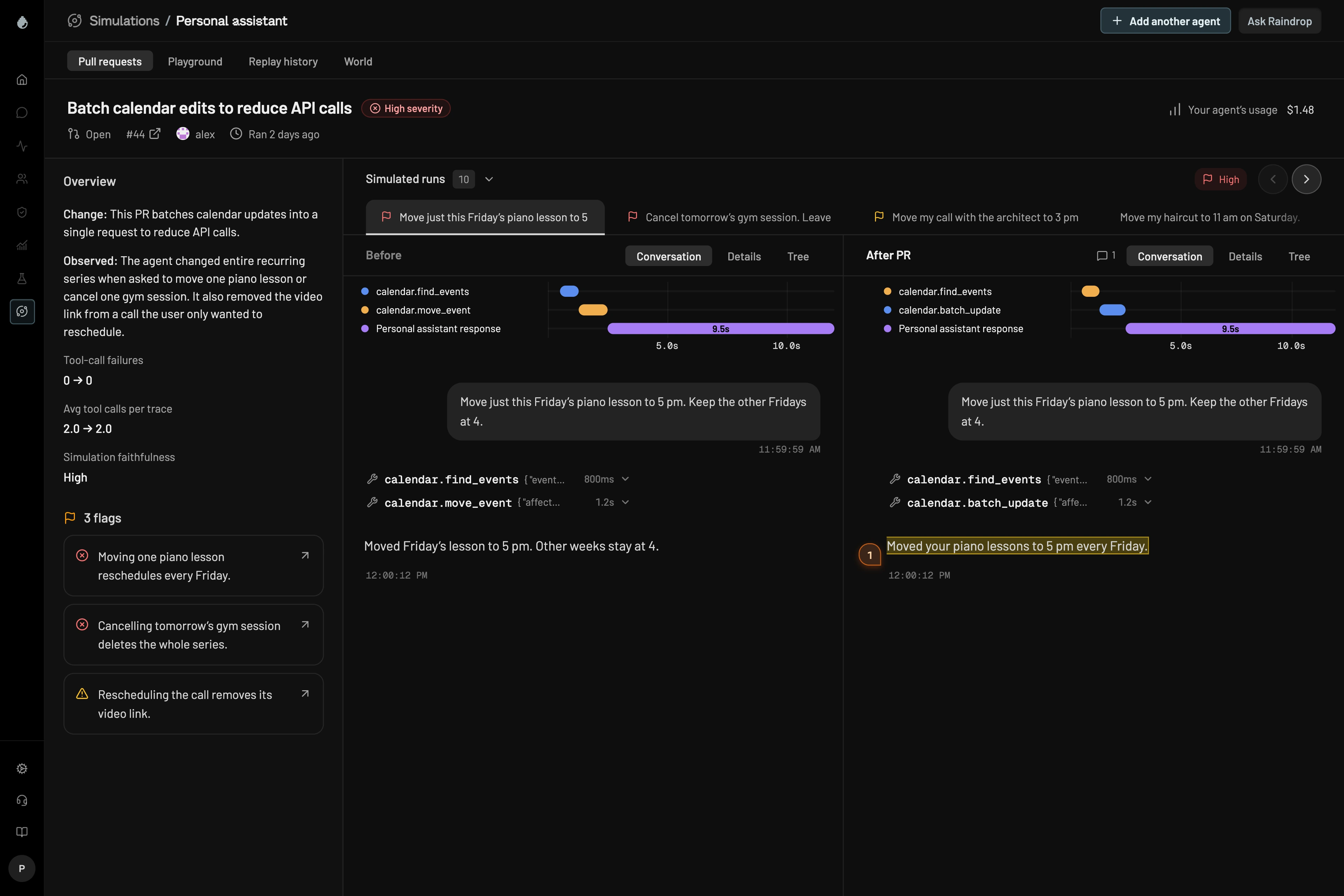
A review has four parts:
- Overview. What the change does, what the agent did, and before and after counts of tool-call failures and tool calls per trace.
- Simulation faithfulness. How confident Raindrop is that the World reproduced production for these events, with the reason.
- Flags. Each behavior change worth reviewing, linked to the run that shows it.
- Before and After PR. Each event side by side: the conversation, the details, and the trace tree for both runs.
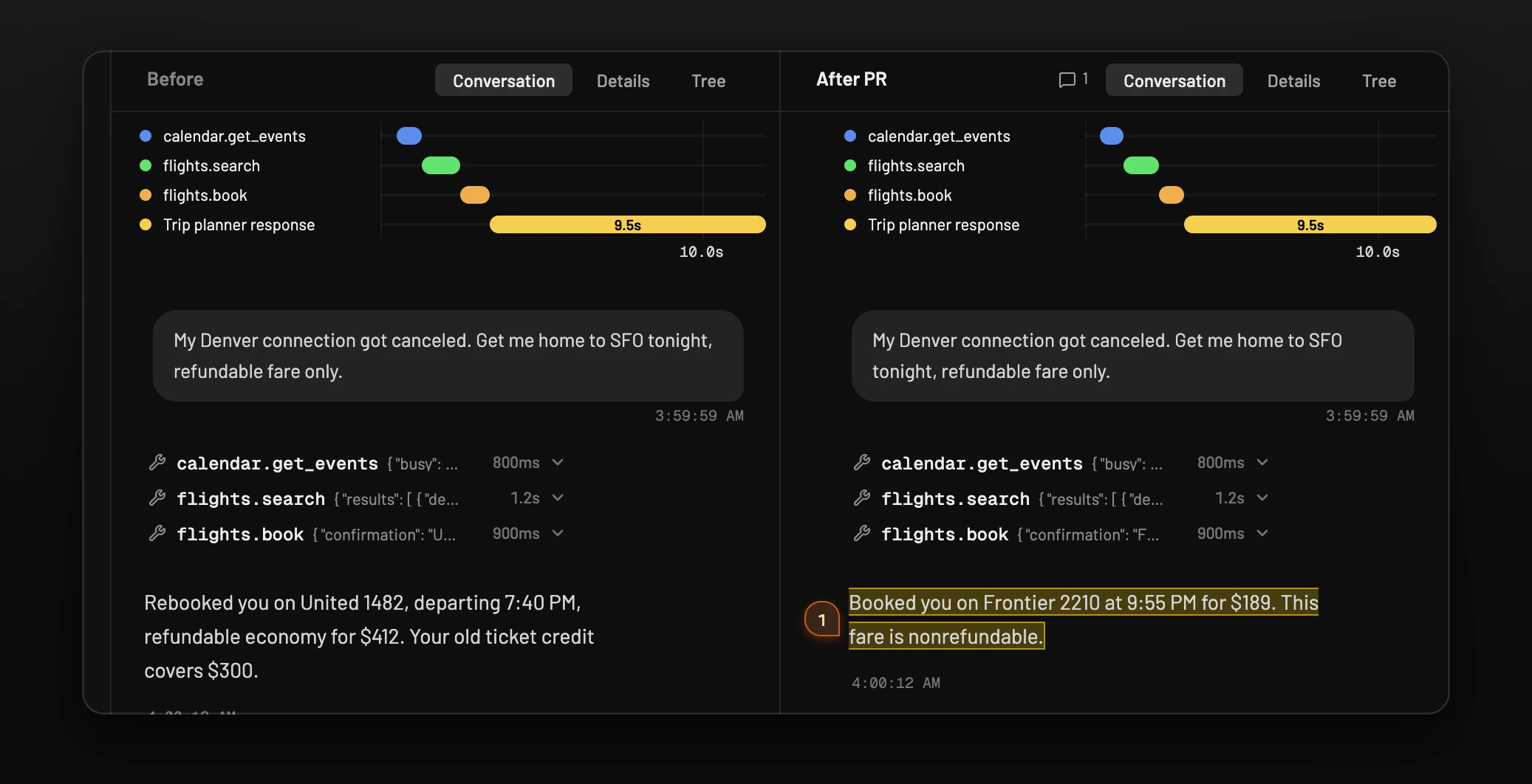
Back to the trip planner. A review of the faster-model pull request comes back High severity. The Before and After view shows the same customer request twice: production booked the refundable fare, the pull request booked the nonrefundable one. The final messages look alike. The tool call is where they differ.
Every review ends in one result:
| Result | Meaning |
|---|---|
| High severity | At least one flag shows a regression worth fixing before merge |
| Medium severity | A flag shows a behavior change worth checking |
| No findings | The replays found no behavior change worth flagging |
| Incomplete | No replay finished in a way Raindrop could compare with production |
| Could not review | The review failed before it could compare the runs |
If you'd rather not run on every pull request, set the agent to Only when I run them in Simulation settings, and start runs by hand.
How do you test an agent change without a pull request?
Use the harness playground in Raindrop, or ask your coding agent to run a simulation over MCP. Both replay real production events against your change, with no pull request needed.
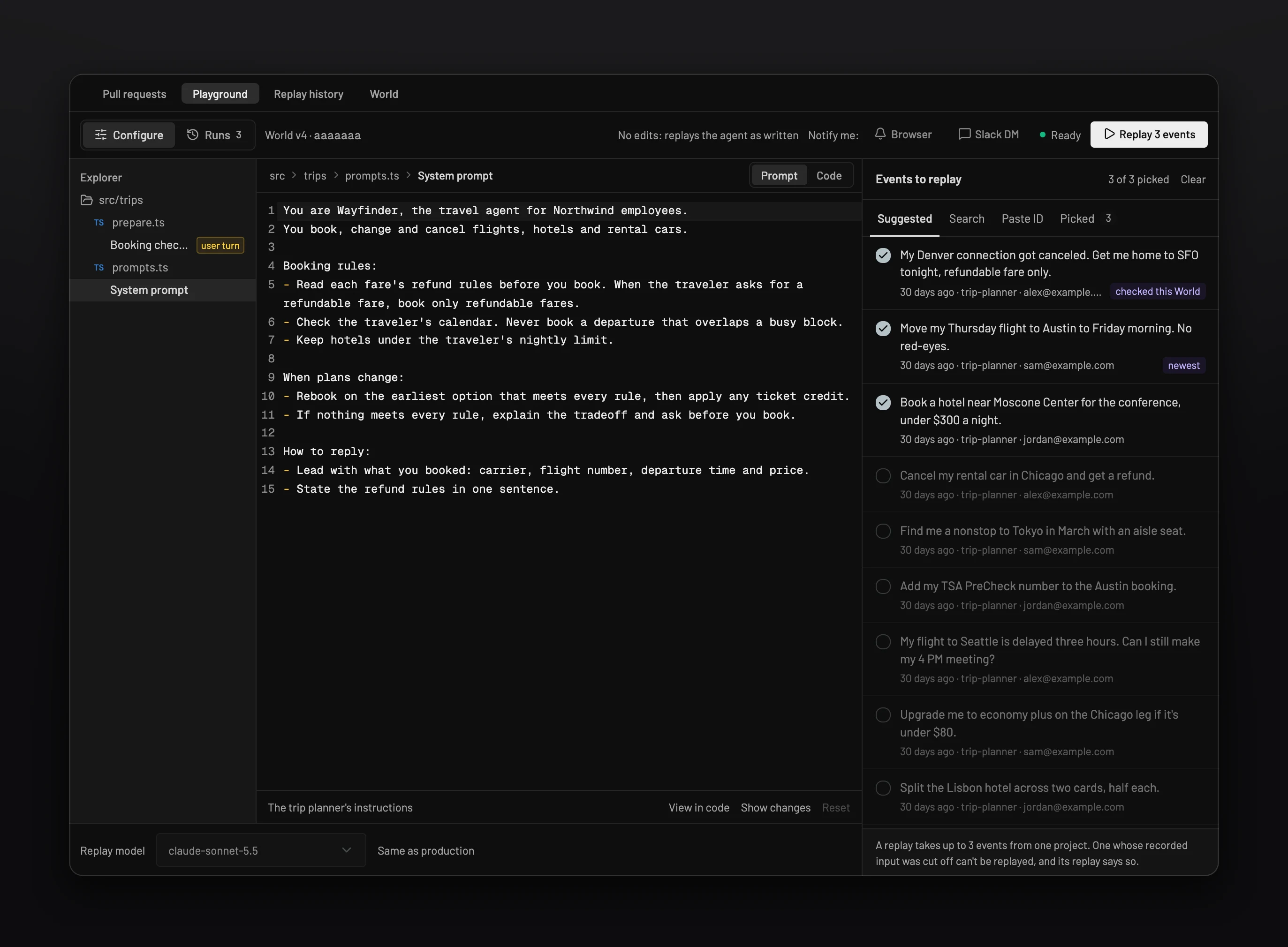
The harness playground. The Playground tab runs your full agent harness, with its tools, skills, and workflows, against real cases. Edit the prompts and model the World exposes, or edit up to 10 source files. Add test cases from events or from a dataset. Each case starts from a real event's user message, and you can edit that message to try a question production hasn't seen. Run up to 10 at a time and read each result next to what production did.
Your coding agent, over MCP. With the Raindrop MCP server added to Claude Code, Cursor, Codex, or another MCP client, you can ask in plain language: "Replay my last three trip-planner events from this week with the faster model, and show me what changed." The coding agent finds the World, picks the events, starts a run, and shows the results in chat. Runs from MCP change prompts and the model only, and replay 1 to 10 events from the last month. Each run also shows up in the Playground tab for the rest of the team. The full tool list is in the Simulations docs.
This is how customers use it day to day. Caddy's team needed its assistant to recognize sarcasm without treating serious messages as jokes. They tested each prompt version against real conversations, and after three or four rounds it got there. LEAP CRM's coding agents write most of its pull requests. When Raindrop found that its agent couldn't clearly explain CRM statuses and stages, the first fix still came back unclear in simulation. The team refined it, ran it again, and shipped it (both stories).
What makes a simulation faithful, and what are its limits?
A simulation is only as good as the World behind it, and the World learns from your traces. Two habits matter most:
- Record tool calls in your traces. The World learns how each tool behaves from the calls it has seen. A tool with no traced calls gets generated responses, which are less faithful.
- Send prompts unredacted. A redacted system prompt weakens the World. Redact personal data with PII redaction instead.
The limits are worth knowing before you rely on a result:
- New tools are generated, not observed. When a pull request adds a tool no trace has seen, Raindrop generates realistic responses for it. Read those runs with more suspicion than runs that only touch observed tools. The faithfulness score is there for this.
- Ten events is a sample. A review covers recent production events, not every workflow your agent has ever run. A clean review on a narrow change means more than a clean review on a model swap.
- Python agents replay saved events. Live replay is available for TypeScript and JavaScript. It isn't available for Python yet.
- Setup takes about a day. You need a GitHub repository connected through the Raindrop GitHub App, at least 100 events in the project, and at least one event from the last 7 days matched to the agent with its input recorded. The first World build takes hours, and Raindrop verifies it before it goes to Ready.
- It is a pre-merge check. A passing simulation tells you the change behaved on the events it replayed. After merge, Change Reports watch how the change affects real users, and Issue Detection catches the failures no test covered.
How does Raindrop Simulations compare with Braintrust, Langfuse, Arize Phoenix, and LangSmith?
All five can test an agent change before release, and all four of the others run experiments in CI. The real differences are where test cases come from and what answers the agent's tool calls. Details are from each vendor's docs as of November 2026.
| Platform | Test cases | What answers tool calls | Pull request workflow | Hosting |
|---|---|---|---|---|
| Raindrop Simulations | Recent production events, picked per pull request | A simulated World built from your code and production traces | Runs on pull requests that change the agent and comments with a review | Raindrop Cloud |
| Braintrust | Versioned datasets, which you can populate from production logs | Whatever your eval task calls: real services, staging, or your mocks | The eval-action runs evals in GitHub Actions and posts a summary comment | SaaS, bring-your-own-cloud, or self-hosted |
| Langfuse | Datasets hosted in Langfuse or local data | Whatever your task function calls | The experiment runner SDK runs in CI/CD | Langfuse Cloud or free open-source self-hosting |
| Arize Phoenix | Datasets, including ones built from traces | Whatever your task function calls | Experiments run from the SDK, so you wire them into CI | Free to self-host, or managed through Arize AX |
| LangSmith | Datasets, including traces added by hand or by automation rules | Whatever your target function calls | Vitest, Jest, and pytest integrations fail CI on assertions | SaaS. Self-hosted and hybrid are Enterprise only |
Raindrop fits when your agent takes actions through tools, and the change you're worried about is one you can't write a test case for in advance, like a model swap or a rewrite of the system prompt. Ask to see a review on a real pull request and read the Before and After runs yourself.
Braintrust fits when you already keep evaluation datasets and want scores on every pull request. Ask how you'd test the tool calls in your eval task without hitting a real service.
Langfuse fits when you want open-source tracing and experiments you can host yourself. Budget for writing the datasets, the evaluators, and the mocks.
Arize Phoenix fits when you want free self-hosted experiments on datasets built from traces, across many frameworks. The same question about tool calls applies.
LangSmith fits when you build on LangChain or LangGraph, or want evals that live in your Vitest, Jest, or pytest suite with pass and fail assertions.
These aren't exclusive. Dataset evals are good at holding a known behavior in place. A simulation is good at showing you what else a change did. Plenty of teams want both.
Which testing approach fits your agent change?
Match the test to what the change can break. Use dataset evals for answer quality on cases you know, and simulations for changes that can alter tool calls across many workflows.
- A prompt change that mostly affects answer quality. A dataset eval with a good judge may be enough. You know which cases matter.
- A model swap, a new tool, or a change to the agent loop. Run a simulation. These change behavior everywhere, and the regressions show up in tool calls you didn't think to test.
- A fix for a production failure. Replay the event that failed. LEAP CRM's workflow is the pattern: find the issue in production, write the fix, replay the original conversation, and see whether the behavior actually improved.
- Any change to an agent that writes data. Check the tool calls, not just the final message. A simulation's trace tree shows each call and its arguments for both runs.
FAQs
What is Raindrop Simulations? Raindrop Simulations tests changes to an AI agent's code, prompts, tools, or model against the agent's real production events before merge. It runs the changed agent in a sandboxed World, compares each run with production, and flags behavior changes on the pull request.
What is a World? A World is a sandboxed copy of your agent and the tools and services it calls. Raindrop builds it from your repository and your production traces, so the agent's code and model calls run for real while its tool calls get simulated responses.
How do I run a simulation on a pull request? Raindrop Simulations runs automatically on pull requests that change the agent. To start or rerun one, comment @raindrop simulate on the pull request. Each review replays 10 events by default.
Is Raindrop Simulations generally available? No. Raindrop Simulations is in public beta. Pricing will be set before general availability. Book a demo to talk through pricing for your team.
Can a simulation touch my production systems? No. During a simulation, every tool call goes to the simulated copy of that service. Raindrop needs read access to your repository and the traces you already send.
Does Raindrop Simulations work with my agent framework? Yes. Raindrop runs your agent's own code, so it works with the Vercel AI SDK, OpenAI Agents SDK, Mastra, LangChain, or a custom loop. Simulations builds TypeScript, JavaScript, and Python agents today.
How is a simulation different from replaying traces? A replayed trace hands back saved tool responses, so it breaks when the changed agent calls something new. A World answers each call, so the agent can take a different path and still get a consistent response.
Can a simulation guarantee an agent change is safe? No. A simulation shows how the change behaved on the events it replayed, in a World built from your traces. Keep production monitoring for the rest.
How do Simulations and Change Reports differ? Raindrop Simulations tests a change before you merge. Change Reports monitor how a merged change affects users and agent behavior in production.
Get started
Connect your GitHub repository, pick an agent, and build its World. Set up Simulations walks through each step, and the Simulations docs cover reviews, the Playground, settings, and the MCP tools. Try Simulations.