> ## Documentation Index
> Fetch the complete documentation index at: https://raindrop.ai/docs/llms.txt
> Use this file to discover all available pages before exploring further.
# Workshop
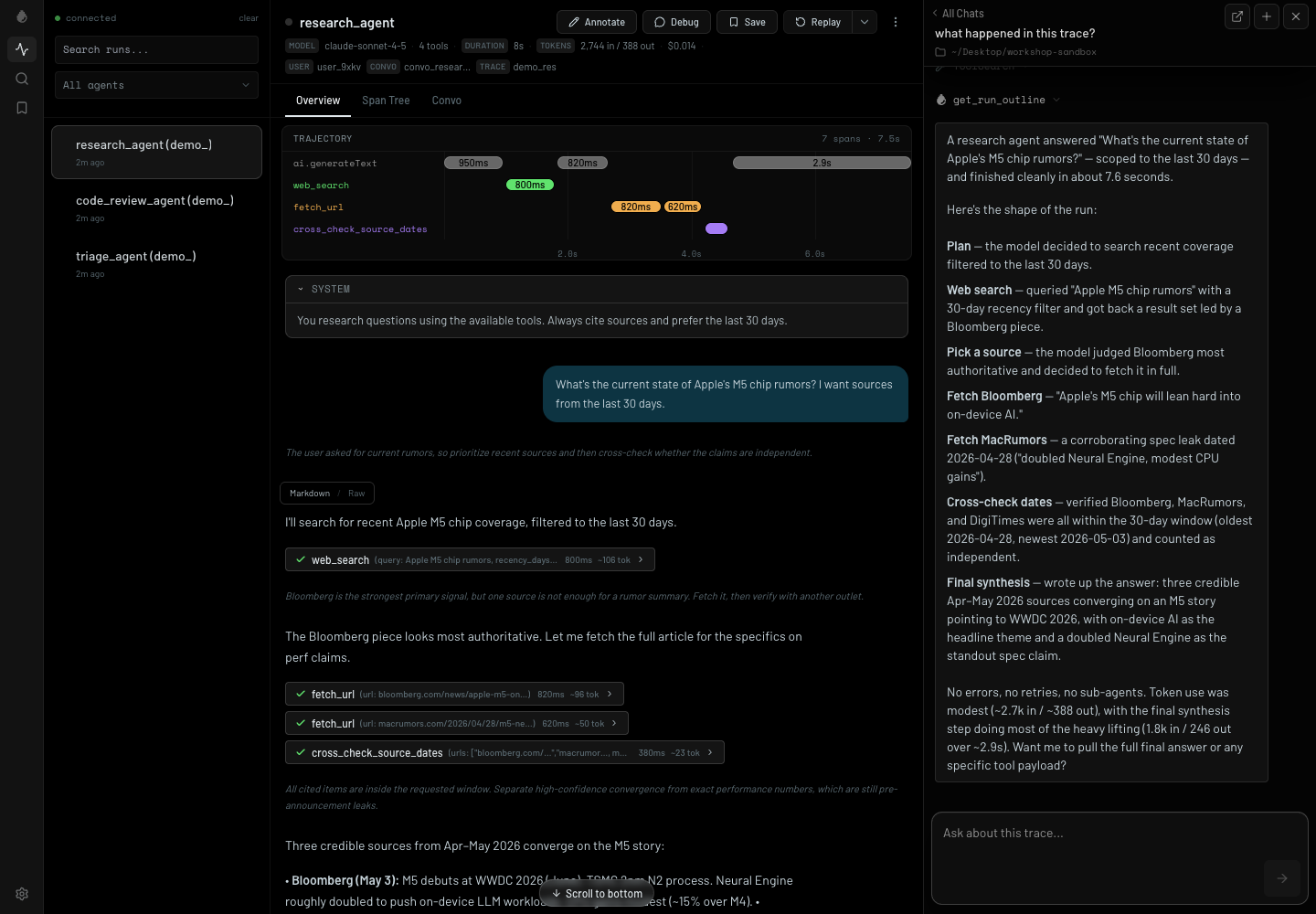
> A local debugger for AI agents. Watch every token, tool call, and decision stream into your browser as it happens.
Raindrop Workshop is the [open-source](https://github.com/raindrop-ai/workshop) local debugger your agent is missing. It runs on your machine, mirrors traces from your agent locally, and gives your coding agent the context it needs to understand failures, write evals, and fix the code that caused them.
 ## Install
```bash theme={null}
curl -fsSL https://raindrop.sh/install | bash
```
## Instrument your agent
Open Claude Code, Codex, Cursor, or another coding agent in your project and run:
```text theme={null}
/instrument-agent
```
This wires Raindrop tracing into your app and opens Workshop in your browser. Traces stream in as soon as your agent runs.
## What you get
Watch tool calls, timing, inputs, outputs, and errors stream in while your agent runs.
Ask your local coding agent what happened in a trace and let it inspect the run directly from Workshop.
Turn failures into tests, patch the agent, and verify behavior without losing the trace context.
Rerun a trace to help you ship with confidence.
## Ask what happened
Workshop ships with the tools your coding agent needs to inspect traces, find failures, and run replays — no additional setup. Open the chat pane and ask:
```text theme={null}
what happened in this trace?
```
Your agent can query the trace, find failures, and help you decide what to inspect or fix next.
## Replay locally
Workshop can also help you test your changes. Rerun your agent with an adjusted system prompt, tool definitions, or a new model.
Set it up from your coding agent:
```text theme={null}
/setup-agent-replay
```
After that, you can replay from the Workshop UI or ask your coding agent to replay a trace as part of a fix loop.
Replay is designed for the work you do after a root-cause read:
* replace the last user message and rerun the trace
* try a different model or system prompt
* verify that a code or prompt patch changes the resulting trajectory
* compare the original trace to the replayed local run
## The workflow
```text theme={null}
/instrument-agent
```
Run from your coding agent. Wires Raindrop tracing into your app and opens Workshop locally.
Any Raindrop SDK in your project that sees `RAINDROP_LOCAL_DEBUGGER` mirrors traces to Workshop while still using your normal code path.
Open a run to see the timeline, model calls, tool calls, payloads, timing, and errors.
Ask your local agent to inspect the active Workshop trace, explain what happened, and help patch the code.
Once replay is set up for the project, run the same trace through your local agent code and watch the new trace stream back into Workshop.
## Compatible with your stack
* **Languages:** TypeScript, Python, Go, Rust
* **SDKs and frameworks:** Vercel AI SDK, OpenAI Agents SDK, Anthropic SDK, Claude Agent SDK, LangChain, LangGraph, CrewAI, Mastra, Pydantic AI, DSPy, Google ADK, Strands, Agno, Deep Agents
* **Providers:** AWS Bedrock, Azure OpenAI, Vertex AI
* **Coding agents:** Claude Code, Codex, Devin, Cursor, OpenCode
* **Transport:** Raindrop SDKs or OTLP JSON at `/v1/traces`
## Useful commands
```bash theme={null}
raindrop workshop # start and open the UI
raindrop workshop setup # write .env, then start and open
raindrop workshop status # check health
raindrop workshop stop # stop Workshop
raindrop update # update the binary
```
## Next
Connect your editor to production Raindrop data and the Triage agent.
Instrument a TypeScript or Node.js agent so local traces show up in Workshop.
## Install
```bash theme={null}
curl -fsSL https://raindrop.sh/install | bash
```
## Instrument your agent
Open Claude Code, Codex, Cursor, or another coding agent in your project and run:
```text theme={null}
/instrument-agent
```
This wires Raindrop tracing into your app and opens Workshop in your browser. Traces stream in as soon as your agent runs.
## What you get
Watch tool calls, timing, inputs, outputs, and errors stream in while your agent runs.
Ask your local coding agent what happened in a trace and let it inspect the run directly from Workshop.
Turn failures into tests, patch the agent, and verify behavior without losing the trace context.
Rerun a trace to help you ship with confidence.
## Ask what happened
Workshop ships with the tools your coding agent needs to inspect traces, find failures, and run replays — no additional setup. Open the chat pane and ask:
```text theme={null}
what happened in this trace?
```
Your agent can query the trace, find failures, and help you decide what to inspect or fix next.
## Replay locally
Workshop can also help you test your changes. Rerun your agent with an adjusted system prompt, tool definitions, or a new model.
Set it up from your coding agent:
```text theme={null}
/setup-agent-replay
```
After that, you can replay from the Workshop UI or ask your coding agent to replay a trace as part of a fix loop.
Replay is designed for the work you do after a root-cause read:
* replace the last user message and rerun the trace
* try a different model or system prompt
* verify that a code or prompt patch changes the resulting trajectory
* compare the original trace to the replayed local run
## The workflow
```text theme={null}
/instrument-agent
```
Run from your coding agent. Wires Raindrop tracing into your app and opens Workshop locally.
Any Raindrop SDK in your project that sees `RAINDROP_LOCAL_DEBUGGER` mirrors traces to Workshop while still using your normal code path.
Open a run to see the timeline, model calls, tool calls, payloads, timing, and errors.
Ask your local agent to inspect the active Workshop trace, explain what happened, and help patch the code.
Once replay is set up for the project, run the same trace through your local agent code and watch the new trace stream back into Workshop.
## Compatible with your stack
* **Languages:** TypeScript, Python, Go, Rust
* **SDKs and frameworks:** Vercel AI SDK, OpenAI Agents SDK, Anthropic SDK, Claude Agent SDK, LangChain, LangGraph, CrewAI, Mastra, Pydantic AI, DSPy, Google ADK, Strands, Agno, Deep Agents
* **Providers:** AWS Bedrock, Azure OpenAI, Vertex AI
* **Coding agents:** Claude Code, Codex, Devin, Cursor, OpenCode
* **Transport:** Raindrop SDKs or OTLP JSON at `/v1/traces`
## Useful commands
```bash theme={null}
raindrop workshop # start and open the UI
raindrop workshop setup # write .env, then start and open
raindrop workshop status # check health
raindrop workshop stop # stop Workshop
raindrop update # update the binary
```
## Next
Connect your editor to production Raindrop data and the Triage agent.
Instrument a TypeScript or Node.js agent so local traces show up in Workshop.