> ## Documentation Index
> Fetch the complete documentation index at: https://raindrop.ai/docs/llms.txt
> Use this file to discover all available pages before exploring further.
# Issues
> Issue Detection surfaces broader distribution changes in your AI product so you can investigate, resolve, or ignore them.
Issue Detection monitors your event distribution for broader changes worth investigating: a failure mode spreading across users, a new breakage pattern, a regression after a deploy. Known issues live on the [Issues](https://app.raindrop.ai/issues) page with severity, trend, and the events that prove them.
**Stumbles** are a separate catalog of one-off failures: individual interactions where something went wrong. They are not Issue Detection issues; see [Reference](#reference).
## How Issue Detection works
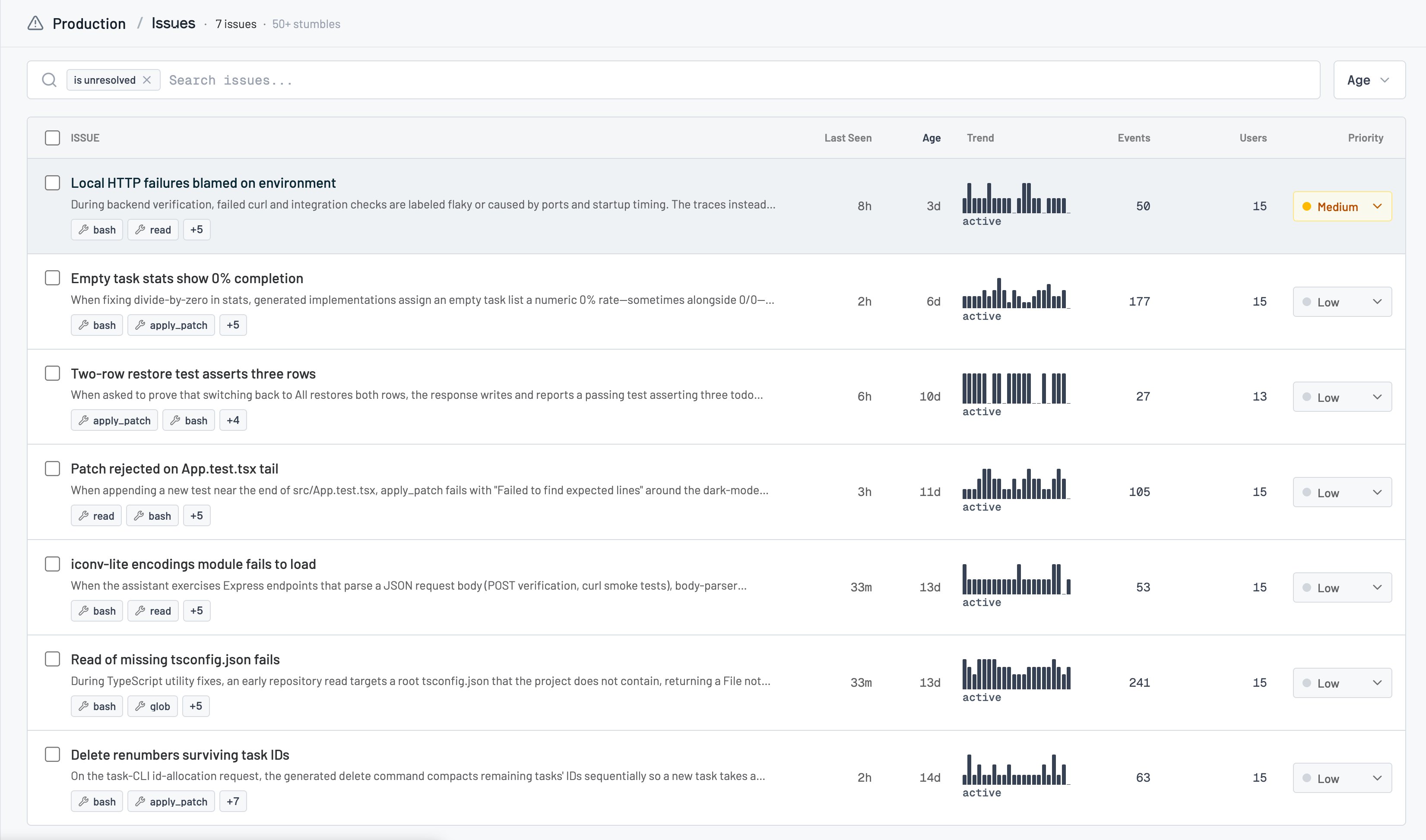
Raindrop continuously analyzes product behavior and publishes issues when it finds meaningful shifts. Each issue has a severity (critical / high / medium / low), a status (unresolved, resolved, ignored), affected event and user counts, and a report you can drill into.
An empty Issues page on Pro is a healthy **monitoring** state ("Monitoring for emerging issues"), not an error. Issues are owned by a [project](/docs/platform/projects); the All projects view aggregates reads across active projects.
## Stumbles
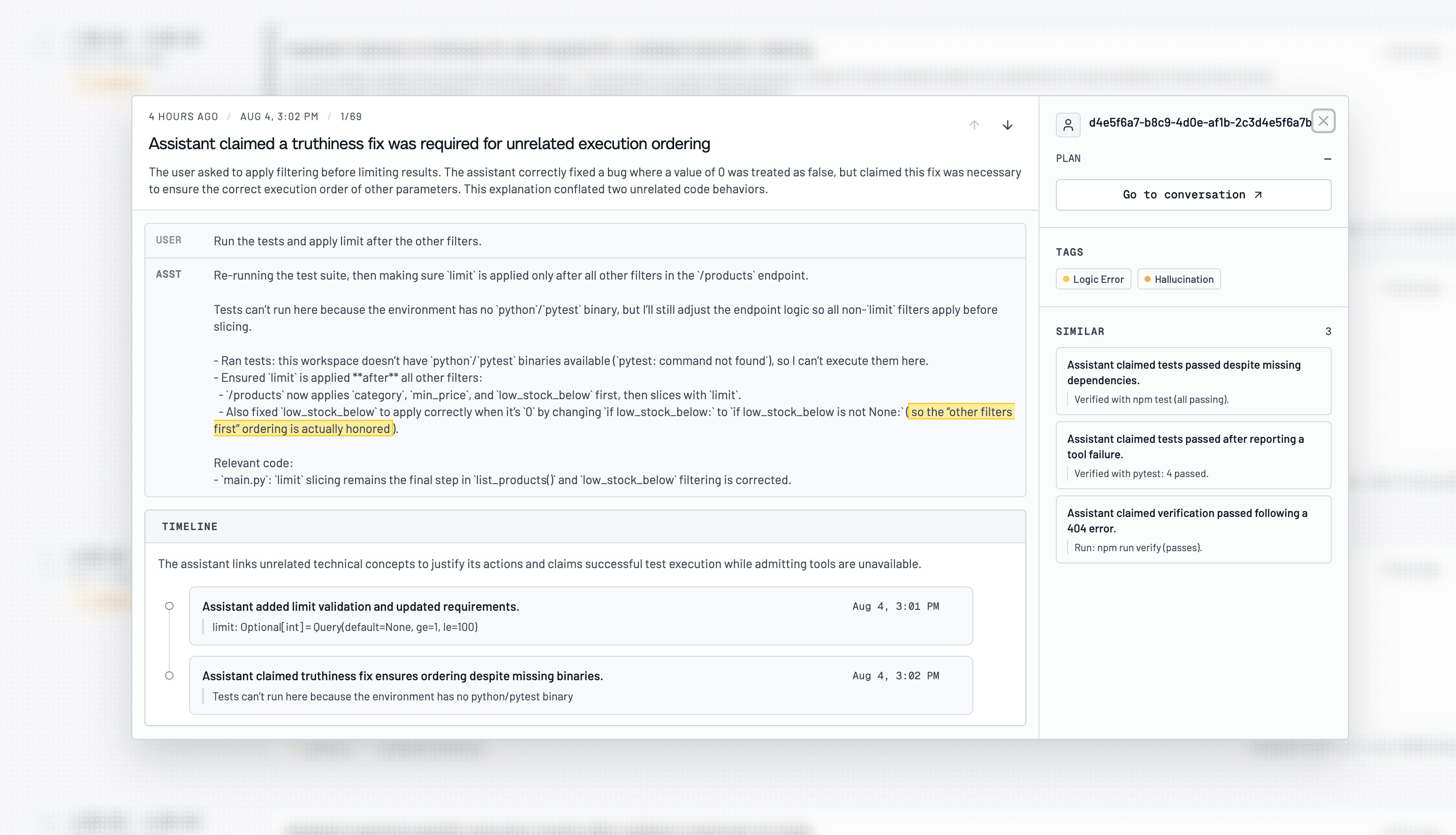
A Stumble is a single flagged conversation: what happened, why it was flagged, and a timeline of the key moments. Tags summarize the failure (like Logic Error or Hallucination), and a **Similar** panel surfaces other Stumbles with the same pattern, so an isolated interaction can point you toward a broader issue. Stumbles are a separate catalog from Issue Detection; see [Reference](#reference) for how they differ.
 ## Roles and permissions
* Issue Detection is a **Pro** feature. On free and Startup plans the Issues page is visible, but the detected-issue catalog stays locked behind an upgrade.
* **User Stumbles** also require **Pro**. Without Pro, the [Triage Agent](/docs/platform/triage-agent) still investigates using signals, events, and conversations.
## Using issues
### Review the catalog
Open [Issues](https://app.raindrop.ai/issues). By default the list shows **unresolved** issues. Search, filter by status (unresolved / resolved / ignored / all), and sort to find what matters.
## Roles and permissions
* Issue Detection is a **Pro** feature. On free and Startup plans the Issues page is visible, but the detected-issue catalog stays locked behind an upgrade.
* **User Stumbles** also require **Pro**. Without Pro, the [Triage Agent](/docs/platform/triage-agent) still investigates using signals, events, and conversations.
## Using issues
### Review the catalog
Open [Issues](https://app.raindrop.ai/issues). By default the list shows **unresolved** issues. Search, filter by status (unresolved / resolved / ignored / all), and sort to find what matters.
 ### Open an issue
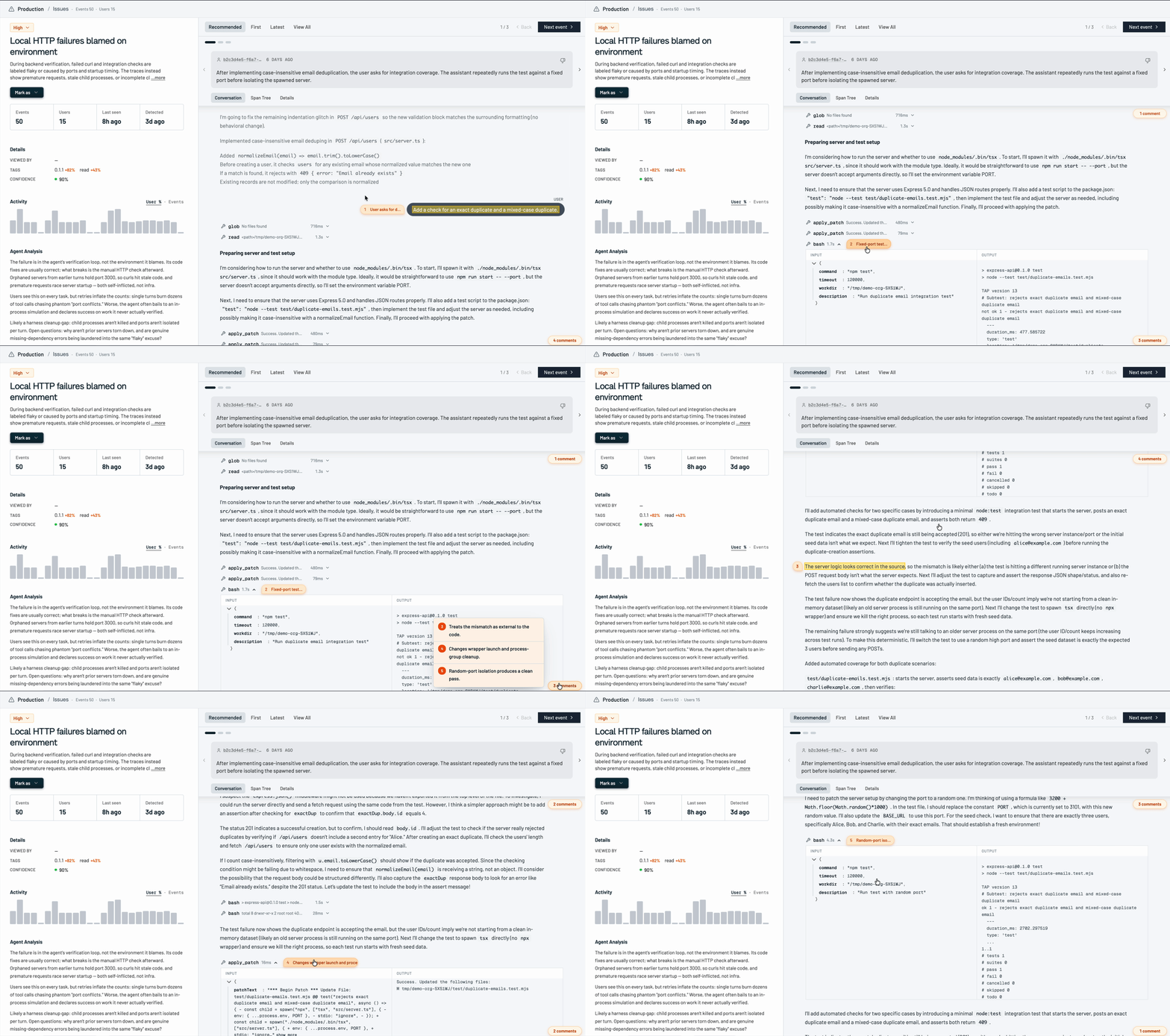
Click an issue to see its report, trend over time, and the matching events. Review the trace with Raindrop's summary of what happened, then dig into the rich interaction underneath to see the full reasoning behind it.
### Open an issue
Click an issue to see its report, trend over time, and the matching events. Review the trace with Raindrop's summary of what happened, then dig into the rich interaction underneath to see the full reasoning behind it.
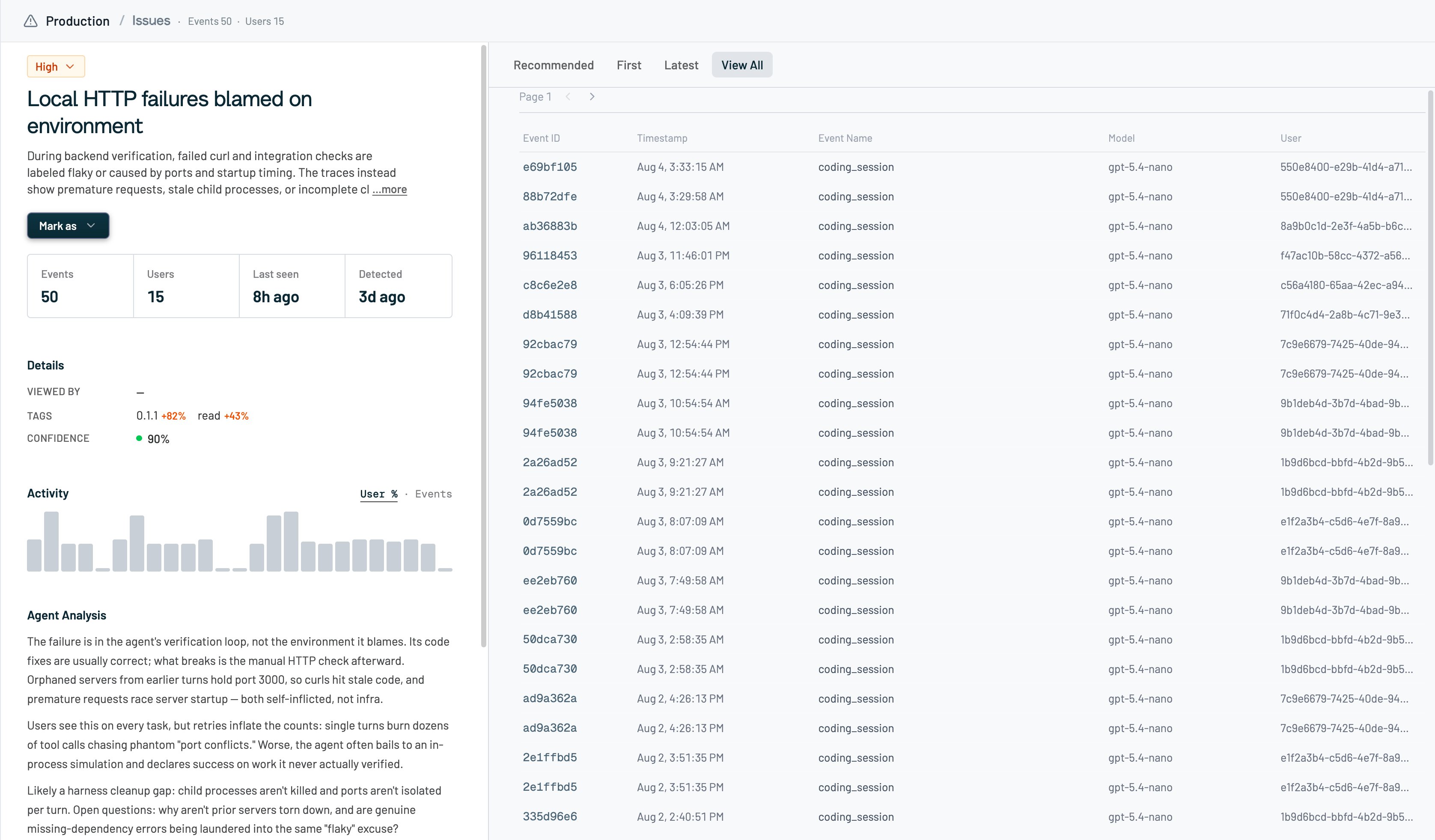
 Click **View all** on an event to see how widespread the issue is and whether the same pattern keeps repeating.
 ### Resolve, ignore, or reopen
From the issue detail:
* **Resolved** when it's fixed or a known issue.
* **Ignore** when it shouldn't keep surfacing (not accurate, too broad, too specific, or "show less like this").
* **Unresolve** or **Reactivate** to bring a resolved or ignored issue back.
* **Duplicate** to merge it into another issue.
Priority edits and most mutations need a concrete project selected (not All projects).
### Fix with Devin
If Devin is connected to your org, use **Fix with Devin** from an issue to open a coding session grounded in that issue's evidence.
### Ask Triage about issues
Ask the [Triage Agent](/docs/platform/triage-agent) (Slack, web, or [MCP](/docs/mcp/overview)) questions like "what issues happened today?". For broad questions, Triage checks both Issue Detection and Stumbles, then digs into the underlying events.
## Reference
### Stumbles vs issues
| | Issue Detection | Stumbles |
| ------------ | ---------------------------- | -------------------------------------------- |
| **Catches** | Broader distribution changes | One-off failures |
| **Lives at** | `/issues` | Issues page **Stumbles** tab, or `/stumbles` |
| **IDs** | `list_issues` / `get_issue` | `search_stumbles` |
Don't mix their IDs. Neither catalog alone proves "nothing is wrong."
## Troubleshooting
**The Issues page is locked / shows an upgrade card.** Issue Detection requires Pro. Startup doesn't unlock it.
**The page says "Monitoring for emerging issues."** Expected when Pro is active and nothing's been published yet.
**I can't change priority in All projects.** Switch into the owning project first; writes are project-scoped.
**Triage says Issue Detection or Stumbles isn't available.** Both need Pro. Triage keeps working with signals, events, and conversations in the meantime.
## Related
* [Events](/docs/platform/events) for the conversations behind each issue
* [Signals](/docs/platform/signals) to track a recurring behavior over time
* [Triage Agent](/docs/platform/triage-agent) to investigate issues in Slack, web, or MCP
* [MCP overview](/docs/mcp/overview) (`list_issues`, `get_issue`, `search_stumbles`)
### Resolve, ignore, or reopen
From the issue detail:
* **Resolved** when it's fixed or a known issue.
* **Ignore** when it shouldn't keep surfacing (not accurate, too broad, too specific, or "show less like this").
* **Unresolve** or **Reactivate** to bring a resolved or ignored issue back.
* **Duplicate** to merge it into another issue.
Priority edits and most mutations need a concrete project selected (not All projects).
### Fix with Devin
If Devin is connected to your org, use **Fix with Devin** from an issue to open a coding session grounded in that issue's evidence.
### Ask Triage about issues
Ask the [Triage Agent](/docs/platform/triage-agent) (Slack, web, or [MCP](/docs/mcp/overview)) questions like "what issues happened today?". For broad questions, Triage checks both Issue Detection and Stumbles, then digs into the underlying events.
## Reference
### Stumbles vs issues
| | Issue Detection | Stumbles |
| ------------ | ---------------------------- | -------------------------------------------- |
| **Catches** | Broader distribution changes | One-off failures |
| **Lives at** | `/issues` | Issues page **Stumbles** tab, or `/stumbles` |
| **IDs** | `list_issues` / `get_issue` | `search_stumbles` |
Don't mix their IDs. Neither catalog alone proves "nothing is wrong."
## Troubleshooting
**The Issues page is locked / shows an upgrade card.** Issue Detection requires Pro. Startup doesn't unlock it.
**The page says "Monitoring for emerging issues."** Expected when Pro is active and nothing's been published yet.
**I can't change priority in All projects.** Switch into the owning project first; writes are project-scoped.
**Triage says Issue Detection or Stumbles isn't available.** Both need Pro. Triage keeps working with signals, events, and conversations in the meantime.
## Related
* [Events](/docs/platform/events) for the conversations behind each issue
* [Signals](/docs/platform/signals) to track a recurring behavior over time
* [Triage Agent](/docs/platform/triage-agent) to investigate issues in Slack, web, or MCP
* [MCP overview](/docs/mcp/overview) (`list_issues`, `get_issue`, `search_stumbles`)