> ## Documentation Index
> Fetch the complete documentation index at: https://raindrop.ai/docs/llms.txt
> Use this file to discover all available pages before exploring further.
# Cost Tracking
> Understand and track your LLM spend in Raindrop.
The **Costs** page shows your model spend by model, provider, and project.
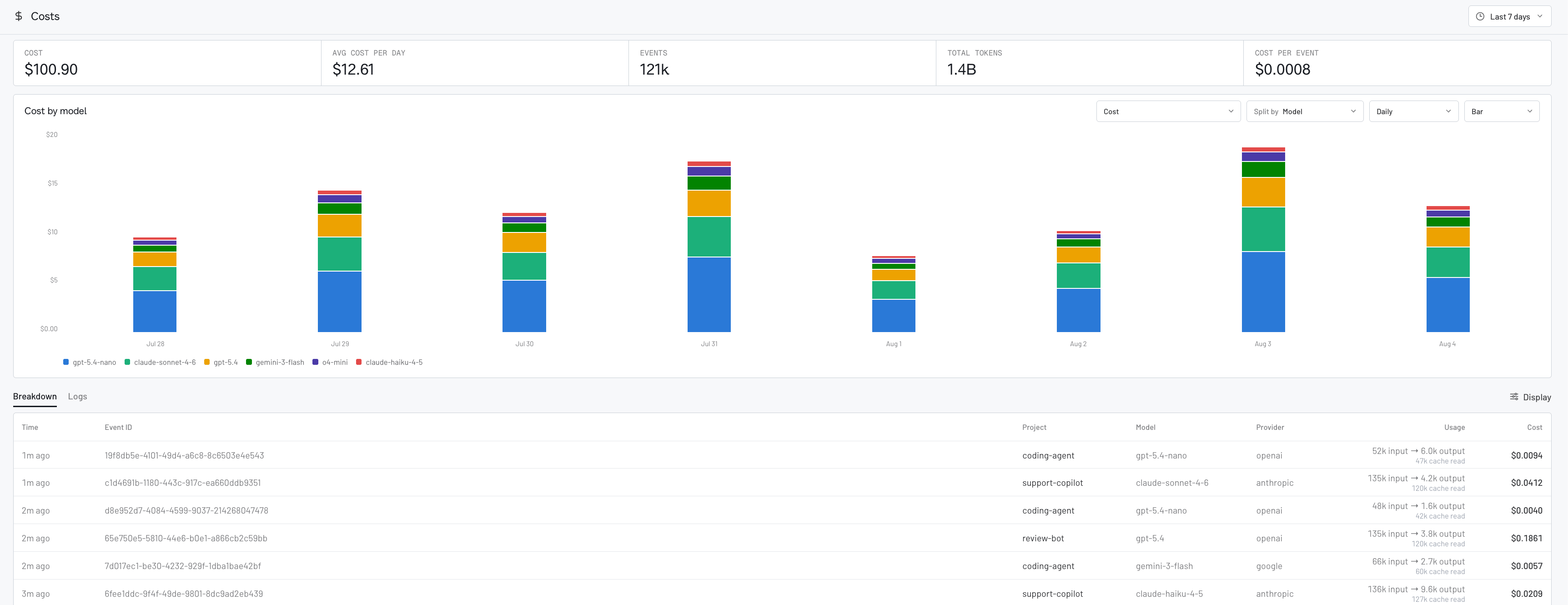 ## How cost tracking works
Raindrop calculates cost from the model usage captured by your integration
using a versioned catalog of public model rates. It accounts for uncached
input, cache reads, cache writes, output, reasoning, and tiered rates. If a
provider or gateway reports a total cost, Raindrop uses it.
## Using cost tracking
### Automatic integrations: upgrade and deploy
If you use one of these integrations, upgrade it to the minimum version and
deploy. You do not need to change your instrumentation, add model prices, or
calculate costs yourself.
| Package | Minimum version | Integration |
| ------------------------------- | --------------- | -------------- |
| `@raindrop-ai/ai-sdk` | `0.3.1` | Vercel AI SDK |
| `@raindrop-ai/openrouter-agent` | `0.2.2` | OpenRouter |
| `@raindrop-ai/pi-agent` | `0.1.3` | Pi |
| `@raindrop-ai/azure-openai` | `0.1.1` | Azure OpenAI |
| `@raindrop-ai/bedrock` | `0.1.1` | Amazon Bedrock |
| `@raindrop-ai/vertex-ai` | `0.1.1` | Google Vertex |
| `@raindrop-ai/opencode-plugin` | `0.1.3` | OpenCode |
| `raindrop-ai` (PyPI) | `0.0.66` | Python tracing |
For Python, your existing setup must have tracing enabled and already capture
your LLM calls. New model calls will appear on **Costs** after deployment;
historical calls are not backfilled.
### Direct TypeScript SDK or HTTP
If you use the base `raindrop-ai` TypeScript SDK or send events with raw HTTP,
include the model's raw usage counts. Raindrop handles the pricing.
| Path | Minimum version | What you add |
| ---------------------------- | --------------- | ------------------------------- |
| `raindrop-ai` (npm) | `0.3.1` | `model` and `usage` |
| `POST /v1/events/track` HTTP | — | One linked `/v1/traces` request |
#### TypeScript SDK
Upgrade the base [`raindrop-ai` TypeScript SDK](/docs/sdk/typescript) to `0.3.1`
or later:
```bash pnpm theme={null}
pnpm add raindrop-ai@latest
```
```bash npm theme={null}
npm install raindrop-ai@latest
```
```bash yarn theme={null}
yarn add raindrop-ai@latest
```
Add `model` and the provider's raw usage counts to your existing `finish()`
call:
```typescript theme={null}
await interaction.finish({
output,
model,
usage: {
provider,
inputTokens,
outputTokens,
},
});
```
The same `usage` object also works with `trackAi()`. When the provider
returns them, also pass `cacheReadTokens`, `cacheWriteTokens`,
`reasoningTokens`, and `providerReportedCost`. Pass the raw values exactly as
reported; do not subtract cached or reasoning tokens yourself.
#### Raw HTTP
Keep your existing `POST /v1/events/track` call. After each model call, send
one linked model span to `POST https://api.raindrop.ai/v1/traces` using the
same `event_id`:
```http theme={null}
POST https://api.raindrop.ai/v1/traces
Authorization: Bearer
Content-Type: application/json
```
Send a standard [OTLP/HTTP JSON](https://opentelemetry.io/docs/specs/otlp/#otlphttp)
span named `ai.model.usage` with these attributes:
| Attribute | Value |
| -------------------------------------------------- | ---------------------- |
| `traceloop.span.kind` | `llm` |
| `traceloop.association.properties.event_id` | The event's `event_id` |
| `raindrop.usage.source` | `manual` |
| `gen_ai.provider.name` | Provider name |
| `gen_ai.request.model` and `gen_ai.response.model` | Model name |
| `gen_ai.usage.input_tokens` | Raw input token count |
| `gen_ai.usage.output_tokens` | Raw output token count |
Use standard OTLP trace and span IDs and nanosecond timestamps. Await the
request so short-lived workers do not exit before it is sent. Use the same
`X-Raindrop-Project-Id` header as your event request when sending to a
specific project.
Add `gen_ai.usage.cache_read_input_tokens`,
`gen_ai.usage.cache_write_input_tokens`, `gen_ai.usage.reasoning_tokens`, or
`gen_ai.usage.provider_reported_cost` when your provider returns them. Do not
estimate missing values.
Deploy, send a new model call, and confirm it appears on **Costs**. Existing
historical calls are not backfilled.
Copy this prompt into Claude Code, Codex, Cursor, or another coding agent:
```text theme={null}
Set up Raindrop Cost Tracking in this repository.
Goal
- Make new model calls appear on Raindrop's Costs page with model, provider,
project, token usage, and USD cost.
- Use an official Raindrop integration or the existing raw HTTP path. Do not
add custom pricing logic.
Inspect first
1. Detect the language, package manager, installed Raindrop packages,
existing Raindrop initialization, and model call sites. Use the existing
package manager and do not duplicate instrumentation.
2. For an installed automatic JavaScript or TypeScript integration, upgrade
it to at least the matching version:
@raindrop-ai/ai-sdk 0.3.1 (Vercel AI SDK)
@raindrop-ai/openrouter-agent 0.2.2 (OpenRouter)
@raindrop-ai/pi-agent 0.1.3 (Pi)
@raindrop-ai/azure-openai 0.1.1 (Azure OpenAI)
@raindrop-ai/bedrock 0.1.1 (Amazon Bedrock)
@raindrop-ai/vertex-ai 0.1.1 (Google Vertex)
@raindrop-ai/opencode-plugin 0.1.3 (OpenCode)
Make the change
3. Upgrade each installed automatic integration that is below its minimum.
Prefer the latest compatible release. Do not change its instrumentation.
4. For Python, upgrade raindrop-ai to at least 0.0.66. Confirm the existing
setup emits LLM model spans with tracing enabled. Plain track_ai event
properties alone are not the cost-tracking path.
5. If the TypeScript raindrop-ai base SDK is used directly without one of
the automatic integrations above, upgrade it to at least 0.3.1 and pass
model plus usage to the existing trackAi or finish call. Usage requires
provider, inputTokens, and outputTokens; also pass cacheReadTokens,
cacheWriteTokens, reasoningTokens, and providerReportedCost when the
provider returns them. Copy the provider's raw counts without normalizing
them. Do not add this when another integration instruments the same call.
6. If the app posts directly to /v1/events/track, preserve that request and
add one OTLP/HTTP JSON LLM model span to /v1/traces for each model call.
Use a standard resourceSpans envelope, a random 16-byte base64 trace ID,
a random 8-byte base64 span ID, nanosecond timestamps, and the span name
ai.model.usage. Authenticate with the existing Raindrop write key and use
the same X-Raindrop-Project-Id header as the event request.
Link it with traceloop.association.properties.event_id using the exact
event_id from the event request. Include raindrop.usage.source=manual,
gen_ai.provider.name, gen_ai.request.model, gen_ai.response.model,
gen_ai.usage.input_tokens, and gen_ai.usage.output_tokens. Include the
gen_ai.usage.cache_read_input_tokens,
gen_ai.usage.cache_write_input_tokens, gen_ai.usage.reasoning_tokens,
and gen_ai.usage.provider_reported_cost attributes only when available.
Await the request or use the runtime's waitUntil mechanism.
7. If no supported Raindrop integration is installed and there is no existing
HTTP path, identify the AI SDK or provider actually used by the
application and follow the matching
official guide at https://www.raindrop.ai/docs/integrations/overview.
Do not guess at an unsupported wrapper.
8. Preserve the existing Raindrop API key, project configuration, event
grouping, and model-call behavior. Do not add provider-specific token
normalization, hard-coded model prices, or manual cost calculations.
9. Update the existing lockfile. Do not introduce a second package manager.
Verify
10. Run the repository's relevant typecheck, build, lint, and tests.
11. Confirm there is only one active instrumentation path around each model
call and that no secret or API key was committed.
12. Report:
- the integration package and version found
- the version installed
- every file changed
- the verification commands and results
- any model call path that could not be covered
Do not add a separate cost-tracking service or pricing catalog. Once the
supported integration is deployed, new model calls should populate
Raindrop's Costs page. Historical calls are not backfilled.
```
### Ask for a breakdown
You can also ask the [Triage Agent](/docs/platform/triage-agent) or your coding
assistant through [Raindrop MCP](/docs/mcp/overview) for spend totals, cost by model
or provider, and trends over time.
## Related
* [Triage Agent](/docs/platform/triage-agent) to ask for spend in chat
* [MCP overview](/docs/mcp/overview) to query costs from your coding agent
* [Integrations overview](/docs/integrations/overview) for per-framework setup
## How cost tracking works
Raindrop calculates cost from the model usage captured by your integration
using a versioned catalog of public model rates. It accounts for uncached
input, cache reads, cache writes, output, reasoning, and tiered rates. If a
provider or gateway reports a total cost, Raindrop uses it.
## Using cost tracking
### Automatic integrations: upgrade and deploy
If you use one of these integrations, upgrade it to the minimum version and
deploy. You do not need to change your instrumentation, add model prices, or
calculate costs yourself.
| Package | Minimum version | Integration |
| ------------------------------- | --------------- | -------------- |
| `@raindrop-ai/ai-sdk` | `0.3.1` | Vercel AI SDK |
| `@raindrop-ai/openrouter-agent` | `0.2.2` | OpenRouter |
| `@raindrop-ai/pi-agent` | `0.1.3` | Pi |
| `@raindrop-ai/azure-openai` | `0.1.1` | Azure OpenAI |
| `@raindrop-ai/bedrock` | `0.1.1` | Amazon Bedrock |
| `@raindrop-ai/vertex-ai` | `0.1.1` | Google Vertex |
| `@raindrop-ai/opencode-plugin` | `0.1.3` | OpenCode |
| `raindrop-ai` (PyPI) | `0.0.66` | Python tracing |
For Python, your existing setup must have tracing enabled and already capture
your LLM calls. New model calls will appear on **Costs** after deployment;
historical calls are not backfilled.
### Direct TypeScript SDK or HTTP
If you use the base `raindrop-ai` TypeScript SDK or send events with raw HTTP,
include the model's raw usage counts. Raindrop handles the pricing.
| Path | Minimum version | What you add |
| ---------------------------- | --------------- | ------------------------------- |
| `raindrop-ai` (npm) | `0.3.1` | `model` and `usage` |
| `POST /v1/events/track` HTTP | — | One linked `/v1/traces` request |
#### TypeScript SDK
Upgrade the base [`raindrop-ai` TypeScript SDK](/docs/sdk/typescript) to `0.3.1`
or later:
```bash pnpm theme={null}
pnpm add raindrop-ai@latest
```
```bash npm theme={null}
npm install raindrop-ai@latest
```
```bash yarn theme={null}
yarn add raindrop-ai@latest
```
Add `model` and the provider's raw usage counts to your existing `finish()`
call:
```typescript theme={null}
await interaction.finish({
output,
model,
usage: {
provider,
inputTokens,
outputTokens,
},
});
```
The same `usage` object also works with `trackAi()`. When the provider
returns them, also pass `cacheReadTokens`, `cacheWriteTokens`,
`reasoningTokens`, and `providerReportedCost`. Pass the raw values exactly as
reported; do not subtract cached or reasoning tokens yourself.
#### Raw HTTP
Keep your existing `POST /v1/events/track` call. After each model call, send
one linked model span to `POST https://api.raindrop.ai/v1/traces` using the
same `event_id`:
```http theme={null}
POST https://api.raindrop.ai/v1/traces
Authorization: Bearer
Content-Type: application/json
```
Send a standard [OTLP/HTTP JSON](https://opentelemetry.io/docs/specs/otlp/#otlphttp)
span named `ai.model.usage` with these attributes:
| Attribute | Value |
| -------------------------------------------------- | ---------------------- |
| `traceloop.span.kind` | `llm` |
| `traceloop.association.properties.event_id` | The event's `event_id` |
| `raindrop.usage.source` | `manual` |
| `gen_ai.provider.name` | Provider name |
| `gen_ai.request.model` and `gen_ai.response.model` | Model name |
| `gen_ai.usage.input_tokens` | Raw input token count |
| `gen_ai.usage.output_tokens` | Raw output token count |
Use standard OTLP trace and span IDs and nanosecond timestamps. Await the
request so short-lived workers do not exit before it is sent. Use the same
`X-Raindrop-Project-Id` header as your event request when sending to a
specific project.
Add `gen_ai.usage.cache_read_input_tokens`,
`gen_ai.usage.cache_write_input_tokens`, `gen_ai.usage.reasoning_tokens`, or
`gen_ai.usage.provider_reported_cost` when your provider returns them. Do not
estimate missing values.
Deploy, send a new model call, and confirm it appears on **Costs**. Existing
historical calls are not backfilled.
Copy this prompt into Claude Code, Codex, Cursor, or another coding agent:
```text theme={null}
Set up Raindrop Cost Tracking in this repository.
Goal
- Make new model calls appear on Raindrop's Costs page with model, provider,
project, token usage, and USD cost.
- Use an official Raindrop integration or the existing raw HTTP path. Do not
add custom pricing logic.
Inspect first
1. Detect the language, package manager, installed Raindrop packages,
existing Raindrop initialization, and model call sites. Use the existing
package manager and do not duplicate instrumentation.
2. For an installed automatic JavaScript or TypeScript integration, upgrade
it to at least the matching version:
@raindrop-ai/ai-sdk 0.3.1 (Vercel AI SDK)
@raindrop-ai/openrouter-agent 0.2.2 (OpenRouter)
@raindrop-ai/pi-agent 0.1.3 (Pi)
@raindrop-ai/azure-openai 0.1.1 (Azure OpenAI)
@raindrop-ai/bedrock 0.1.1 (Amazon Bedrock)
@raindrop-ai/vertex-ai 0.1.1 (Google Vertex)
@raindrop-ai/opencode-plugin 0.1.3 (OpenCode)
Make the change
3. Upgrade each installed automatic integration that is below its minimum.
Prefer the latest compatible release. Do not change its instrumentation.
4. For Python, upgrade raindrop-ai to at least 0.0.66. Confirm the existing
setup emits LLM model spans with tracing enabled. Plain track_ai event
properties alone are not the cost-tracking path.
5. If the TypeScript raindrop-ai base SDK is used directly without one of
the automatic integrations above, upgrade it to at least 0.3.1 and pass
model plus usage to the existing trackAi or finish call. Usage requires
provider, inputTokens, and outputTokens; also pass cacheReadTokens,
cacheWriteTokens, reasoningTokens, and providerReportedCost when the
provider returns them. Copy the provider's raw counts without normalizing
them. Do not add this when another integration instruments the same call.
6. If the app posts directly to /v1/events/track, preserve that request and
add one OTLP/HTTP JSON LLM model span to /v1/traces for each model call.
Use a standard resourceSpans envelope, a random 16-byte base64 trace ID,
a random 8-byte base64 span ID, nanosecond timestamps, and the span name
ai.model.usage. Authenticate with the existing Raindrop write key and use
the same X-Raindrop-Project-Id header as the event request.
Link it with traceloop.association.properties.event_id using the exact
event_id from the event request. Include raindrop.usage.source=manual,
gen_ai.provider.name, gen_ai.request.model, gen_ai.response.model,
gen_ai.usage.input_tokens, and gen_ai.usage.output_tokens. Include the
gen_ai.usage.cache_read_input_tokens,
gen_ai.usage.cache_write_input_tokens, gen_ai.usage.reasoning_tokens,
and gen_ai.usage.provider_reported_cost attributes only when available.
Await the request or use the runtime's waitUntil mechanism.
7. If no supported Raindrop integration is installed and there is no existing
HTTP path, identify the AI SDK or provider actually used by the
application and follow the matching
official guide at https://www.raindrop.ai/docs/integrations/overview.
Do not guess at an unsupported wrapper.
8. Preserve the existing Raindrop API key, project configuration, event
grouping, and model-call behavior. Do not add provider-specific token
normalization, hard-coded model prices, or manual cost calculations.
9. Update the existing lockfile. Do not introduce a second package manager.
Verify
10. Run the repository's relevant typecheck, build, lint, and tests.
11. Confirm there is only one active instrumentation path around each model
call and that no secret or API key was committed.
12. Report:
- the integration package and version found
- the version installed
- every file changed
- the verification commands and results
- any model call path that could not be covered
Do not add a separate cost-tracking service or pricing catalog. Once the
supported integration is deployed, new model calls should populate
Raindrop's Costs page. Historical calls are not backfilled.
```
### Ask for a breakdown
You can also ask the [Triage Agent](/docs/platform/triage-agent) or your coding
assistant through [Raindrop MCP](/docs/mcp/overview) for spend totals, cost by model
or provider, and trends over time.
## Related
* [Triage Agent](/docs/platform/triage-agent) to ask for spend in chat
* [MCP overview](/docs/mcp/overview) to query costs from your coding agent
* [Integrations overview](/docs/integrations/overview) for per-framework setup